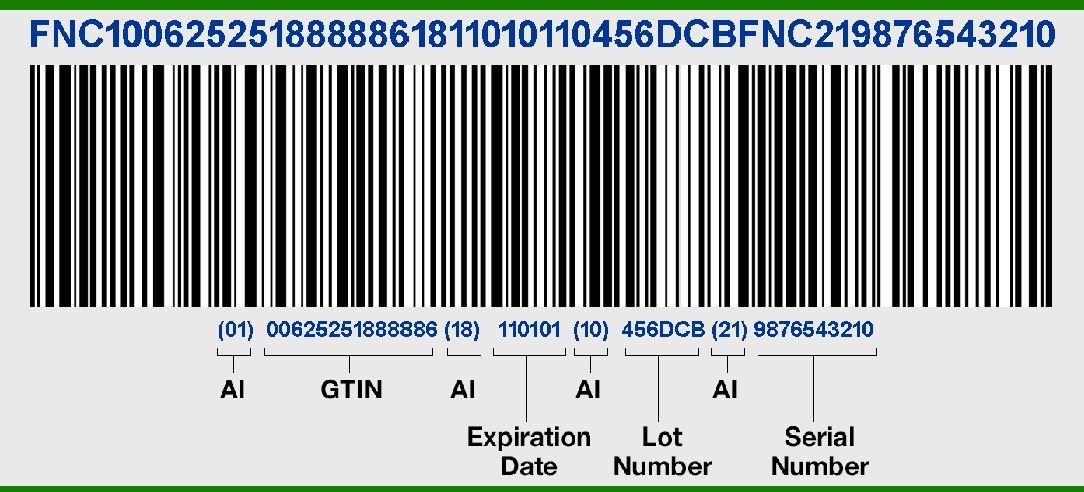
When you need to track inventory, manage logistics, or streamline operations, a Code 128 barcode is often your go-to solution. But understanding the types of Code 128 barcode generators available—and which one fits your specific needs—can feel like navigating a maze. From simple online tools to sophisticated enterprise systems, each offers distinct advantages for creating these high-density, versatile symbols.
Think of it this way: a barcode is more than just a series of black and white lines; it's a critical data carrier for efficiency. And Code 128, in particular, is a workhorse, capable of encoding the full ASCII character set—numbers, letters, and special symbols—making it incredibly flexible for diverse applications. Let's demystify how to create them.
At a Glance: Key Takeaways
- Code 128 is powerful: It's a high-density, variable-length barcode that encodes all 128 ASCII characters, making it ideal for internal inventory, logistics, and asset tracking.
- Three Sub-Symbologies: Code 128A (uppercase, numbers), Code 128B (general-purpose: upper, lower, numbers – most common), and Code 128C (optimized for numeric pairs).
- Generator Options Abound: You can create Code 128 barcodes using free online tools, dedicated desktop software, programming libraries, or integrated enterprise systems.
- Accuracy is Key: Proper data, sub-symbology choice, correct sizing, and a clear "quiet zone" are crucial for scannability.
- Online tools are convenient: Great for single barcodes; services like OnlineLabels.com offer a free, user-friendly way to generate and download.
- Dedicated software offers more: Tools like QRForgePro provide advanced features like batch generation, customization, and multiple export formats.
- Manual creation is impractical: Due to Code 128's complex encoding, you'll always need a generator.
Code 128: The Workhorse of Modern Barcoding
Before diving into how to generate them, it's worth appreciating why Code 128 is such a cornerstone in industries from logistics to healthcare. This isn't just another barcode; it's a highly efficient symbology designed for complex data. It compresses a lot of information into a small space, allowing you to encode numbers, letters, and various special characters—all 128 ASCII characters, in fact. This high-density capability, combined with a robust built-in check digit for error correction, ensures data integrity and reliable scanning.
The brilliance of Code 128 lies in its adaptability, primarily through its three distinct sub-symbologies:
- Code 128A (Code Set A): Best for uppercase alphanumeric characters and some control characters. Think about identifying specific product batches or serialized assets where data often includes capital letters and numbers.
- Code 128B (Code Set B): The most common and general-purpose set. It handles both uppercase and lowercase letters, numbers, and a broader range of special characters. If you're unsure which to use, Code 128B is often a safe bet for diverse internal tracking needs.
- Code 128C (Code Set C): Optimized for purely numeric data, specifically when numbers appear in pairs. It achieves the highest data density for numeric strings, making it excellent for encoding long strings of digits like serial numbers or product quantities in warehouse logistics.
The generator you choose will often let you pick which sub-symbology is appropriate for your data, or it might automatically select the most efficient one.
Where Code 128 Shines Brightest
Code 128 isn't just technically impressive; its real value comes from its wide application across industries:
- Logistics and Supply Chain Management: From tracking pallets to individual packages, Code 128 ensures smooth movement of goods.
- Healthcare: Managing patient records, lab samples, and pharmaceutical inventory often relies on its robust encoding.
- Manufacturing: Ideal for work-in-progress tracking, component identification, and quality control.
- Retail (Internal Use): While UPC-A and EAN-13 dominate point-of-sale, Code 128 is invaluable for internal inventory, shelf management, and pricing labels.
- Asset Tracking: Keeping tabs on valuable equipment, tools, and IT assets within an organization.
- Document Management: Organizing and retrieving physical files and records.
- Library Management: Identifying books and other media.
This broad utility explains why so many different types of Code 128 barcode generators have emerged, each tailored to different user needs and technical capabilities.
Unpacking the Different Types of Code 128 Barcode Generators
The right tool for generating a Code 128 barcode depends on your volume, technical expertise, budget, and specific integration needs. Let's explore the primary options available.
1. The Instant Gratification: Online Barcode Generators
For occasional users or those needing a quick, single barcode, online generators are incredibly convenient. They are typically free, browser-based, and require no software installation.
How They Work:
You visit a website, select "Code 128" as your barcode type, enter your data, specify basic parameters (like size or quiet zone), and hit "generate." The site then renders the barcode image, usually allowing you to download it in formats like PNG, JPG, or SVG.
Example in Action:
A service like the OnlineLabels.com Barcode Generator exemplifies this type. It's a free online tool that supports Code 128, among other formats like UPC-A and EAN-13, and allows you to Generate Code 128 barcodes quickly for download and printing. You simply select Code 128 from a dropdown, type in your desired alphanumeric data, choose a size, and generate the image.
Pros:
- Accessibility: No installation needed, works on any device with a web browser.
- Cost-effective: Most are free to use.
- Simplicity: User-friendly interfaces for quick generation.
- Immediate Output: Get your barcode image instantly.
Cons: - Limited Customization: Often lack advanced options for fine-tuning appearance or error correction levels.
- Single-Barcode Generation: Typically generate one barcode at a time. For multiple unique codes, you'd need to manually repeat the process or use a mail merge feature in a separate design program like Maestro Label Designer.
- Data Security Concerns: For highly sensitive data, transmitting it to an external server might raise security questions (though for simple internal codes, this is rarely an issue).
- No Batch Processing: Inefficient for generating hundreds or thousands of unique barcodes.
When to Use Them:
When you need a handful of unique Code 128 barcodes for a small project, internal labeling, or testing purposes. They're perfect for quickly creating a barcode for a new asset tag or a temporary inventory item.
2. For Deeper Control: Desktop Barcode Software
Dedicated desktop applications offer more robust features, greater customization, and often batch generation capabilities. These are installed directly onto your computer, providing offline access and more powerful tools.
How They Work:
You purchase and install the software. Within the application, you'll find a richer interface for selecting symbologies, inputting data (often from spreadsheets or databases), configuring advanced parameters (bar width, quiet zone, human-readable text font, color), and exporting in high-resolution formats.
Example in Action:
Software like QRForgePro is designed for comprehensive barcode generation. It typically offers an easy-to-use interface, supports Code 128 along with many other symbologies, and allows for various export formats (SVG, PNG, JPG). Crucially, such software often includes batch generation features, letting you create hundreds or thousands of unique barcodes from a data list, and extensive customization options.
Pros:
- Advanced Customization: Full control over barcode appearance, size, resolution, and human-readable text.
- Batch Generation: Generate multiple unique barcodes efficiently from a spreadsheet or database.
- Offline Access: No internet connection required once installed.
- Higher Quality Output: Often produce vector graphics (SVG, EPS) ideal for professional printing.
- Data Security: Data remains on your local machine.
Cons: - Cost: Generally, these are paid solutions, ranging from affordable to enterprise-level pricing.
- Installation Required: Needs to be installed on each computer where it's used.
- Learning Curve: More features can mean a slightly steeper learning curve than simple online tools.
When to Use Them:
Ideal for small to medium-sized businesses that regularly need to generate Code 128 barcodes in varying quantities, require precise control over their appearance, or need batch processing for inventory and asset management.
3. The Developer's Playground: Programming Libraries & APIs
For developers or organizations with existing software systems (like inventory management, shipping, or ERP), integrating barcode generation directly into their applications is the most efficient approach. This is done using programming libraries (for local integration) or APIs (for cloud-based or service-oriented integration).
How They Work:
A developer uses a code library (e.g., a Java, .NET, Python, or JavaScript library) within their application to programmatically create barcode images based on data dynamically pulled from a database. Alternatively, an API (Application Programming Interface) allows their application to send data to a barcode generation service and receive the barcode image in return.
Pros:
- Seamless Integration: Barcodes are generated automatically as part of an existing workflow (e.g., when a new product is added or a shipment is prepared).
- High Scalability: Can handle massive volumes of barcode generation.
- Custom Logic: Allows for complex rules and data handling specific to an organization's needs.
- Full Automation: Eliminates manual data entry for barcode creation.
Cons: - Requires Technical Expertise: Demands programming skills to implement and maintain.
- Initial Setup Time/Cost: Significant development effort and potentially licensing fees for libraries/APIs.
- Maintenance: Needs ongoing support and updates.
When to Use Them:
Best for medium to large enterprises, software developers building custom applications, or any scenario where barcode generation needs to be fully automated and integrated into a core business system.
4. Enterprise-Grade Solutions: Integrated ERP/WMS Systems
Many modern Enterprise Resource Planning (ERP) or Warehouse Management Systems (WMS) come with built-in barcode generation capabilities. These are not standalone generators but rather features within a larger system designed to manage all aspects of a business or warehouse.
How They Work:
When you create a new product, process an order, or manage inventory within the ERP/WMS, the system automatically generates the necessary Code 128 barcodes (and other types) based on pre-configured rules and data fields. These barcodes are then ready for printing directly from the system, often on specialized label printers.
Pros:
- Holistic Management: Barcode generation is part of a complete system, ensuring data consistency and streamlined workflows across the enterprise.
- Automated Rules: Barcodes are generated based on business logic, reducing human error.
- Reporting and Analytics: Integrates barcode data with broader business intelligence.
- Scalability: Designed to handle the complexity and volume of large organizations.
Cons: - High Cost and Complexity: These systems are expensive and require extensive implementation and training.
- Vendor Lock-in: Integration with specific barcode types and label formats might be tied to the system.
- Limited Customization (Sometimes): While powerful, direct visual customization of barcodes might be less flexible than dedicated design software.
When to Use Them:
Essential for large businesses and corporations with complex inventory, supply chain, and operational management needs where barcode generation must be a seamless, automated part of a larger business ecosystem.
5. Specialized Label Printers with Built-in Capabilities (Brief Mention)
Some high-end thermal label printers, particularly those used in industrial settings, have internal processors and firmware that can generate barcodes directly from data sent to them, sometimes even without requiring a separate computer application. While not a "generator" in the software sense, they serve a similar function by producing the final barcode. These are usually paired with ERP/WMS systems or custom software for data input.
Crafting Your Code 128 Barcode: A Step-by-Step Guide
Regardless of the generator type you choose, the fundamental process for creating an effective Code 128 barcode remains consistent.
1. Choosing Your Generator
Start by assessing your needs. Are you making a single label for an office asset? An online tool or a basic desktop app will suffice. Do you need hundreds of unique codes for new products? Desktop software with batch capabilities is your friend. Are you building a new inventory system? Consider programming libraries or an ERP integration.
2. Preparing Your Data
This is the most crucial step. Your data must be clean, accurate, and consistently formatted. Remember, a barcode stores only the identifier (numeric/alphanumeric), not product names or pricing. For Code 128, this means the string of characters you want to encode (e.g., "INV-12345," "PROD-A-XYZ-001," or a long serial number). Ensure there are no hidden characters or accidental spaces that could corrupt the data.
3. Selecting the Right Sub-Symbology (A, B, or C)
As discussed, Code 128 offers A, B, and C subsets. Most modern generators (especially desktop software and programming libraries) can automatically determine the most efficient sub-symbology based on your input data. However, if your generator allows manual selection:
- Code 128A: If your data is primarily uppercase letters, numbers, and common symbols.
- Code 128B: For a mix of uppercase, lowercase, and numbers—the most versatile choice.
- Code 128C: If your data is entirely numeric and can be parsed into pairs (e.g., "12345678" works well; "12345" might be less efficient than B as the last digit is unpaired).
4. Generating and Customizing
Once your data is ready and the sub-symbology is chosen, initiate generation. Pay close attention to customization options:
- Size: Barcodes should be between 1.25"–2" wide and a minimum of 0.5" high for optimal scanning. Too small, and scanners struggle.
- Quiet Zone: This is the clear, empty space on both sides of the barcode. It's critical for scanning accuracy. Ensure your generator enforces a quiet zone (typically 10 times the narrowest bar width) and that your label design maintains it.
- Human-Readable Text: Most generators allow you to include the encoded data as text below the barcode. This is a vital backup if the barcode becomes unreadable.
- Export Format: Choose high-resolution formats like SVG (vector, scales infinitely without pixelation) or high-DPI PNG/JPG for printing.
5. The Critical Step: Verification and Testing
Never skip this. Generate a test barcode, print it on the actual label material you intend to use, and then scan it with your intended barcode scanner.
- Scan Multiple Times: Test with different scanners if possible, and scan from various angles.
- Check Data Accuracy: Ensure the scanned data exactly matches your input.
- Print Quality: Look for crisp, clear lines, no smudging, bleeding, or faded areas. High-resolution printers are always recommended for optimal readability.
Beyond Generation: Best Practices for Code 128 Readability
A perfectly generated barcode is useless if it can't be scanned. Several factors impact readability:
The "Quiet Zone" Isn't Just a Suggestion
The blank space around your barcode (the quiet zone) is essential for a scanner to correctly identify where the barcode begins and ends. Without it, the scanner might not be able to "frame" the code, leading to read errors. Never print text, graphics, or cut the label too close to the barcode.
Print Quality Matters
- Resolution: Always use a high-resolution printer (300 DPI or higher for thermal, 600 DPI for laser/inkjet).
- Contrast: Black bars on a white background provide the best contrast. Avoid low-contrast colors like light gray bars on a slightly darker gray background.
- Sharpness: Ensure the print is sharp and clear, with no fuzzy edges, smudges, or ink bleed.
Size It Right
Barcode size directly impacts scannability. While Code 128 is highly dense, making it too small will make it unreadable. The recommended size for most applications is 1.25"-2" wide and a minimum of 0.5" high. Always consider the scanning distance and scanner type when determining the optimal size.
Avoiding Common Scanning Pitfalls
- Stretching or Distortion: Avoid stretching or compressing barcode images, as this distorts the bar-to-space ratio, making them unreadable.
- Curved Surfaces: Barcodes printed on highly curved surfaces can be difficult for linear scanners to read. Try to apply barcodes to flat areas.
- Lamination/Glare: Glossy laminates or surfaces can create glare, interfering with scanners. Test your labels with and without protective covers.
Common Questions About Code 128 Barcodes & Their Creation
Can I manually create a Code 128 barcode?
No, you cannot realistically create a Code 128 barcode manually. The encoding process involves complex calculations for character sets, start/stop codes, and a robust check digit. Attempting to draw or manually construct one would be incredibly prone to errors and virtually guaranteed to be unscannable. Always use a dedicated generator.
Do I need a UPC for Code 128?
No, Code 128 is distinct from UPC (Universal Product Code). UPC-A and EAN-13 are specific retail barcodes primarily used for products sold at the point of sale, and they require unique GS1 product identifiers. Code 128 is a more general-purpose, internal barcode often used for inventory, asset tracking, and logistics within a company, not typically for retail checkout. You do not need a GS1-issued UPC number to create a Code 128 barcode.
How much data can a Code 128 barcode hold?
While Code 128 is "high-density," there are practical limits to data length. Technically, it can encode up to 128 ASCII characters. However, as the data length increases, the barcode becomes physically longer, potentially exceeding the scan window of common scanners or becoming too large for the label space. For optimal readability and practical use, it's generally recommended to keep Code 128 data concise, typically under 20-30 characters for most common applications. If you need to encode very large amounts of data, consider 2D barcodes like QR codes or Data Matrix.
What's the difference between Code 128 and other common barcodes like UPC-A?
Code 128 is a versatile, high-density, alphanumeric symbology capable of encoding all 128 ASCII characters, making it ideal for internal tracking. UPC-A, on the other hand, is a numeric-only, fixed-length barcode specifically designed for retail point-of-sale in North America, requiring a GS1 company prefix. Other types include EAN-13 (international retail), Code 39 (basic alphanumeric), and Interleaved 2 of 5 (numeric, high-density for warehousing). Each has its specific strengths and applications; Code 128 stands out for its broad character support and efficiency in internal systems.
Making Your Barcode Strategy Work
Understanding the various types of Code 128 barcode generators empowers you to choose the right tool for the job, whether you're a small business needing a few labels or a large enterprise automating its entire supply chain. The key is to match the generator's capabilities with your specific operational demands, ensuring your barcodes are not only efficiently produced but also reliably scannable. By focusing on data integrity, proper sizing, and adherence to quiet zone requirements, you'll harness the full power of Code 128 to streamline your processes and keep things moving smoothly.